Getting started↑
As organizations scale their AI initiatives and modernize their digital infrastructure, they face a new frontier of complexity. Securing the modern enterprise now requires a unified approach to the two most critical components of the digital landscape: the cryptographic foundation and the AI lifecycle.
AQtive Guard (AQG) is a single, modular platform that provides integrated security through two distinct solutions:
- AQG Cryptographic Posture Management establishes an immutable foundation for your security stack by centralizing and automating your cryptographic inventory. It provides a structured path for Post-Quantum Cryptography (PQC) transition management and secure, future-proof operations across your entire environment.
- AQG AI-SPM delivers active, end-to-end security for AI deployments. By moving beyond simple inventory into automated policy enforcement, it secures your models from code to inference with real-time runtime guardrails.
This guide will help you navigate the platform to establish your cryptographic foundation, manage your PQC transition, and activate the guardrails necessary to protect your AI assets.
Our approach↑
AQtive Guard consolidates these essential security functions into a single, developer-friendly architecture. By unifying cryptographic health and AI governance, AQG removes the friction between security and speed.
The following diagram illustrates principal AQG elements and data flow.
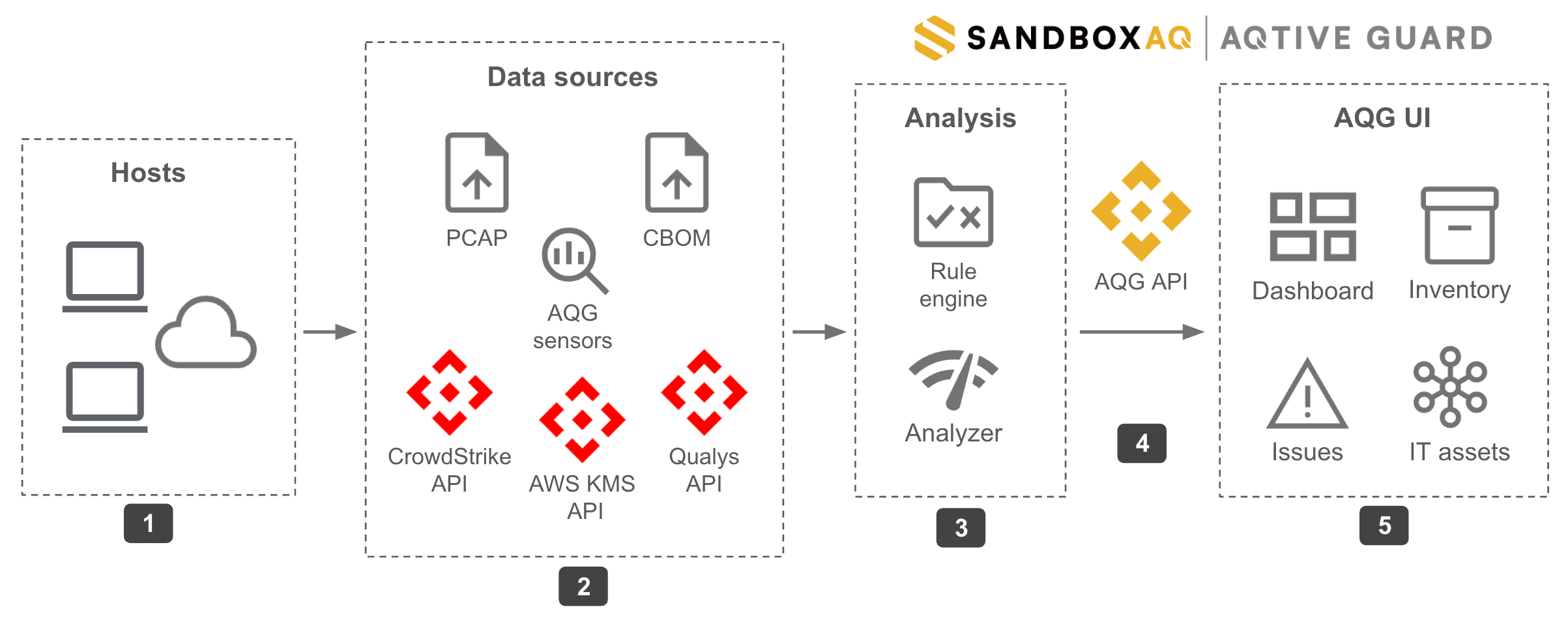
- Host Machines and Cloud Network - The AQG
yanadumptool processes live network traffic and extends monitoring to cloud assets via traffic mirroring, ensuring seamless coverage in hybrid environments. - Data sources - AQG offers powerful AQG sensors, for in-depth cryptographic analysis of filesystems, applications, and physical and virtual networks. It also integrates with a variety of external data sources to centralize your IT assets and crypto inventory.
- Analysis - When AQG analyzes data, it evaluates detected cryptographic objects against the active rules.
- API - The AQG API enables integration and automation, and powers the AQG web UI.
- UI - Provides a user-friendly interface for monitoring your cryptographic posture.
Host machines and cloud network↑
To gain comprehensive insight into cryptographic activity across physical and cloud infrastructures, AQG leverages the yanadump tool. This tool enables real-time processing of live network traffic and extends monitoring to cloud assets through cloud-native traffic mirroring, ensuring seamless coverage in hybrid environments.
Data sources↑
The first step in cryptographic management is understanding the existing cryptographic landscape. AQG achieves comprehensive discovery through a powerful combination of data sources.
AQG provides two types of data sources: native AQG sensors and integrated third-party data sources.
Native AQG sensors↑
Native AQG sensors include the Filesystem Scanner, Java Tracer, and Network Analyzer. Developed by SandboxAQ, these sensors perform deep, comprehensive discovery, often identifying cryptographic assets that other tools might miss.
- Filesystem Scanner scans filesystems and container images to create a trace file containing cryptographic data.
- Java Tracer logs cryptographic calls made by a Java Virtual Machine (JVM) and its associated Java application, generating a trace file with cryptographic data.
- Network Analyzer processes static or streaming network traffic to detect Transport Layer Security (TLS) configurations and handshakes. It can be used with appliances like NetScout or cloud provider tools such as Virtual Private Cloud (VPC) Traffic Mirror.
In addition to the AQG sensors, the AQG File Inspector enables you to upload a file containing keys, certificates, or other cryptographic assets for in-depth analysis in AQtive Guard.
Third-party data sources↑
AQG integrates with existing security and information technology tools, allowing ingestion of data from sources you may already use. Current integrations include:
- Amazon Web Services (AWS) - Ingest data from AWS for a comprehensive view of cryptographic assets and their usage within your AWS environment.
- AWS Key Management Service (KMS) - Ingest data from AWS KMS for enhanced key management and security monitoring.
- CrowdStrike - Import scans from CrowdStrike Falcon and generate a cryptographic analysis of available data.
- Palo Alto Networks - Ingest and analyze TLS handshake data from Next-Generation Firewall log files.
- Qualys - Import Qualys certificate and server scan data and analyze potential cryptographic vulnerabilities.
- SentinelOne - Ingest SentinelOne data for installed applications and IT inventory details.
- ServiceNow - Ingest certificate data from ServiceNow for centralized certificate management and enhanced security posture.
AQG can also ingest and analyze Cryptography Bill of Materials (CBOM) JSON files, binary files uploaded through the AQG File Inspector, and Packet Capture (PCAP) files. This allows for immediate value while planning broader sensor deployment for deeper visibility.
Rules and profiles↑
In AQG, Rules are grouped together as Profiles. These profiles define the criteria for cryptographic analysis. When data is ingested, the system checks the detected cryptography against these rules. If a rule violation is triggered, it logs an Issue.
AQG offers built-in Profiles for NIST compliance and Post-Quantum Cryptography (PQC) readiness. For instance, the NIST Profile includes rules such as Certificate validity too long to help meet NIST recommendations. You can also create custom profiles and rules for specific organizational needs.
Inventory↑
Once data is ingested and rules are applied, information flows into a unified inventory that provides a comprehensive view of scanned cryptographic assets. This centralized visibility is a critical component of your transition to PQC, allowing you to browse, filter, and export data to manage and report on your cryptographic health. You can use global filters—such as profile, severity, source, and current scans—to refine the inventory and focus on specific data based on your triggered rules.
You can use global filters, such as Profile, Severity, Source, and Current Scans, to refine inventory views and focus on targeted details of triggered rules.
Protect↑
AQG Protect moves beyond discovery to the last mile of security by automating credential rotation and enforcing real-time policies essential for PQC transition management. By isolating sensitive credentials and securing access points used by AI agents, Protect eliminates credential exposure and blocks breaches at the source.
Impact Assessment↑
AQG Impact Assessment enables informed, proactive migration decisions and prevents service outages by predicting potential service disruptions before deployment.
Data enrichment↑
AQtive Guard uses data enrichment to provide deeper insights into your cryptographic inventory. It works by leveraging the SandboxAQ proprietary database of publicly known cryptography and associated context to make your inventory actionable. Data enrichment eliminates background noise to quickly identify the root cause of an issue and give you a clearer understanding of your supply chain cryptography.
API↑
AQG provides a comprehensive, robust API with endpoints for custom reporting or data exchanges with external systems. Data displayed in the UI can be easily accessed from these API endpoints using scripting languages like Python. For example, the API can automate cryptography status reports for specific IT assets, significantly reducing manual effort.
UI↑
Dashboard↑
When you first log into AQG, you’re presented with a comprehensive Dashboard. This serves as a central hub, providing an overview of the entire cryptographic environment and immediate insights into the status of scanned IT assets and overall cryptographic health.
Issues↑
The Issues page presents a consolidated and prioritized risk picture. AQG evaluates every key, certificate, and cryptographic operation against rules based on standards like NIST, Federal Information Processing Standards (FIPS), and other industry best practices.
Issues are ranked by Severity and the number of Occurrences, enabling a focus on the most critical concerns immediately. By selecting the Details of an issue, you can explore:
- A brief description of the issue.
- Guidance on how to resolve the finding.
- Risk factors associated with not resolving it.
- References for further information.
- Specifications: The standard configuration of the rule that triggered the finding.
The most critical Dashboard section is Highest impact issues. This area immediately highlights out-of-policy findings, prioritized by severity and occurrences, enabling quick focus on the most pressing security and compliance concerns. To explore issue details, select View or navigate to the Issues tab in the main menu.
Security Knowledge Graph↑
The Security Knowledge Graph (SKG) is a powerful interactive map that visualizes your security landscape, showing the connections between assets and security issues. This helps you understand the full context of a vulnerability, including its origin and potential impact, for more effective security operations.